Key-value store overview
This page describes supported key-value data bases and how to use them
Why KV store?
The VPP-Agent uses external KV store to keep desired state of the VPP/Linux configuration, eventually to store and export certain VPP statistics. The Agent reacts to data events created by changes within a data-store, in case the change of the data was done under a watched key with proper microservice label. It is the microservice label which allows to use single KVDB to serve multiple Agents. Every Agent defines its own label and uses it to distinguish what data were designed for it.
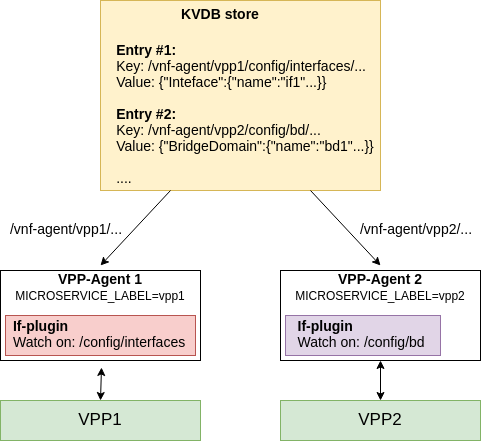
Underlying CN-Infra plugin validates key prefix (always in format /vnf-agent/<microservice-label>) and if the label matches, KV-pair is passed to VPP-Agent configuration watchers. If the prefix of the rest of the key is registered, KV-pair is sent via channel to particular watcher for processing.
The Agent can also connect to multiple different KVDB stores - the plugin called Orchestrator(//TODO add link) safely collects the data from multiple sources and provides it to underlying configuration plugins.
However it is not inevitable to use the Agent with any KVDB store - it can perfectly work without it, obtaining configuration via GRPC (REST in the future) or via local or remote Clientv2(//TODO add link) API (if the Agent is used as library). The KVDB offers very convenient way how to store and manage configuration data.
What KV store can I use?
Technically any. The CN-Infra the VPP-Agent is based on provides connectors to several types of KVDB (see the list below). All of them are built on the common abstraction (called KVDB sync). It comes with significant advantages - the most important is that the change of the data store can be done very easily.
Let's have a look at the example:
import (
    "github.com/ligato/cn-infra/db/keyval/etcd"
    ...
)

func New() *VPPAgent {
    // Prepare KVDB sync plugin with ETCD as a connector
    etcdDataSync := kvdbsync.NewPlugin(kvdbsync.UseKV(&etcd.DefaultPlugin))

    // Put the KVDB sync to a list of proto watchers
    watchers := datasync.KVProtoWatchers{
        etcdDataSync,
    }
    // Provide connection to the orchestrator (or any other plugin)
    orchestrator.DefaultPlugin.Watcher = watchers

    // Other plugins
    ....
}
The code above prepares KVDB sync plugin (KVDB abstraction) with ETCD plugin as connector. The KVDB sync can be then provided as watcher to other plugins (or writer if passed as KVProtoWriters object).
Switch to redis:
import (
    "github.com/ligato/cn-infra/db/keyval/redis"
    ...
)

func New() *VPPAgent {
    // Change KVDB sync plugin to use redis connector
    redisDataSync := kvdbsync.NewPlugin(kvdbsync.UseKV(&redis.DefaultPlugin))

    watchers := datasync.KVProtoWatchers{
        redisDataSync,
    }
    orchestrator.DefaultPlugin.Watcher = watchers

    // Other plugins
    ....
}
The orchestrator now connects to redis data base.
Another advantage is that to add support for new KVDB basically means to write a plugin able to establish connection to the desired database and wire it with the KVDB sync, which is significantly easier and faster.
ETCD
More information: etcd documentation
The ETCD is a distributed KV store that provides data read-write. The ETCD can be started on local machine in its own container with following command:
sudo docker run -p 2379:2379 --name etcd --rm \
    quay.io/coreos/etcd:v3.1.0 /usr/local/bin/etcd \
    -advertise-client-urls http://0.0.0.0:2379 \
    -listen-client-urls http://0.0.0.0:2379
The Agent must start with the KVDB sync plugin using ETCD as a connector (to know how to do this, see code above or code inside this example). Information where the ETCD is running (IP address, port) has to be also provided on the Agent startup via the configuration file.
The minimal content of the file may look as follows:
endpoints:
  - "172.17.0.1:2379"
The config file is passed to the Agent via flag --etcd-confg=<path>. The file contains more fields where ETCD-specific parameters can be set (dial timeout, certification, compaction, etc.). See guide to config files(//TODO add link) for more details.
Note that if the config file is not provided, the connector plugin will not be started and no connection will be established. If the ETCD is not reachable at the address provided, the Agent may not start at all.
Recommended tool to manage ETCD database is the official etcdctl.
Redis
More information: redis documentation
Redis is another type of in-memory data structure store, used as a database, cache or message broker.
Follow this guide to learn how to install redis-server on any machine.
The Agent must start with the KVDB sync plugin using Redis as a connector (to know how to do this, see code above or code inside this example). Information where the Redis is running (IP address, port) has to be also provided on the Agent startup via the configuration file.
The content of the .yaml configuration file:
endpoint: localhost:6379
The config file is provided to the Agent via the flag --redis-config=<path>. See guide to config files(//TODO add link) to learn more about redis configuration.
Note that if the redis config file is not provided, the particular connector plugin will not be started and no connection will be established. If the Redis is not reachable at the provided address, the Agent may not start at all.
Recommended tool to manage Redis database is the redis-cli tool.
Important note: the Redis server is by default started with keyspace event notifications disabled. It means, no data change events are forwarded to the Agent watcher. To enable it, use config SET notify-keyspace-events KA command directly in the redis-cli, or change the settings in the Redis server startup config.
Consul
More information: consul documentation
// TBD
Bolt
More information: bolt documentation // TODO no readme
// TBD
FileDB
More information: fileDB documentation
The fileDB is a special case of database, which uses host OS filesystem as a database. The key-value configuration is stored in text files in defined path. The fileDB connector works as any other KVDB connector, reacts on data change events (file edits) in real time and supports all KVDB features (resync, versioning, microservice labels, ...).
The fileDB is not a process, so it does not need to be started - the Agent only needs correct permission to access files with configuration (and write access if the status is published).
The file with configuration has requisite format and can be kept as .json or .yaml.
As any other KVDB plugin, fileDB also requires config file to load, provided via flag --filedb-config=<path>.
Example config file:
configuration-paths: [/path/to/directory/or/file.txt]
In this case, absence of the config file does not prevent agent from starting, since the configuration files can be created at later point.
The file with configuration can be edited with any text editor, like vim.
How to use it in a plugin
In the plugin which intends to use KVDB connection for publishing or watching, define similar fields of the type:
import (
    "github.com/ligato/cn-infra/datasync"
    ...
}

type Plugin struct {

    ...

    Watcher    datasync.KeyValProtoWatcher
    Publisher datasync.KeyProtoValWriter
}
Prepare the connector in he application plugin definition and set it to the example plugin:
func New() *VPPAgent {
    // Prepare KVDB connector writer and watcher
    etcdDataSync := kvdbsync.NewPlugin(kvdbsync.UseKV(&etcd.DefaultPlugin))
    watchers := datasync.KVProtoWatchers{
        etcdDataSync,
    }
    writers := datasync.KVProtoWriters{
        etcdDataSync,
    }

    // Pass connector to the plugin:
    plugin.Defaultplugin.Watcher = etcdDataSync
    plugin.Defaultplugin.Publisher = etcdDataSync

    ...
}
Watcher
Back in the Plugin, start watcher. The watcher requires two channels of type datasync.ChangeEvent and datasync.ResyncEvent (the resync one is optional) and a set of key prefixes to watch on:
p.resyncEventChannel := make(chan datasync.ResyncEvent)
p.changeEventChannel := make(chan datasync.ChangeEvent)
keyPrefixes := []string{<prefixes>...}

watchRegistration, err = p.Watcher.Watch("plugin-resync-name", p.resyncEventChannel, p.changeEventChannel, keyPrefixes)
Data change and resync events arrive via the particular channel, so the next step is to start the watcher in new go routine:
func (p *Plugin) watchEvents() {
    for {
        select {
        case e := <-p.resyncEventChannel:
            // process resync event
        case e := <-p.changeEventChannel:
            // process data change event
        case <-p.ctx.Done():
            //exit
        }
    }
}
It is a good practice to start event watcher before the watcher registration.
Publisher
Nothing special is required for the publisher. The KeyProtoValWriter object defines method Put(<key>, <value>, <variadic-options>) which allows to store key-value pair to the data store. No 'Delete()' method is defined, objects are removed sending nil data under the key intended to remove.